← → space · scroll · click dots
01 / 19 · Project Beacon
KAUST

Project Beacon · capabilities showcase

KAUST
× Lucid

People movement at scale · 3D scans of real environments · robot, conveyors, sensors on the scan.

Presenter Mohammed-iliès Ayachi mohammed.ayachi@kaust.edu.sa
Principal Investigator Prof. Shehab Ahmed shehab.ahmed@kaust.edu.sa
02 / 19 · Agenda
scope of demonstration

Programme overview.

01
People movement & digital-twin behaviour. GPU-accelerated crowd model running in the browser; reinforcement-learned destination policies over the KAUST campus twin (CitiesOS, COP28); 37 published behavioural rules under the hood. Live demonstration.
02
3D-Gaussian capture of industrial environments. ANPERC main lab and Angle Lab reconstructed from handheld scan; rendered in the browser. Live walk-through.
03
Simulation & scene editing on captured geometry. Robotic cell, conveyors and sensors composited over the 3D-Gaussian scan; direct subtraction and CAD insertion in the captured scene. Live demonstration.
04
Edge computer vision in production. BitXaminer drill-bit inspection (Aramco) · GenSet rig analytics and drillstring dynamics (Aramco) · LineEye factory inspection (HiRoll Technology).
05
Strategic robotics partner programme. Active collaboration with United Robotics Group (Germany) — autonomous mobile robots, lab-automation manipulators, and humanoid platform.
03 / 19 · People movement
what we built

A simulator for how people actually move through a space.

The established crowd-simulation tools in this space are mostly offline planning suites — desktop builds, fixed scenarios, batch runs. We took the same problem and built something that runs live, in the browser, on a real 3D scan of the space — interactive while the floor plan is still being argued about.

Where it could matter on a factory floor

  • Worker flow — finding bottlenecks, comparing line layouts.
  • Mixed traffic — workers and AGVs (automated guided vehicles — driverless tugs and pallet movers running along defined plant routes) sharing the same aisles.
  • Evacuation — egress simulation on the real plant geometry.

What's our particular bet

  • Real-time on the GPU — change a parameter and watch the crowd respond in the same second.
  • Runs in a browser — no install, no workstation, anyone can open it.
  • Sits on a 3D scan — agents walk through the photographed space, not an authored CAD model.
04 / 19 · Digital twin
cognitive agents · COP28

Crowd cognition at urban scale.

CitiesOS demonstrated at the COP28 Climate Action Innovation Zone

KAUST digital twin

Agents don't follow waypoints. Each one carries a destination policy — population segments commute to work, students go to class, services attract residents on a daily rhythm.

Buildings emit attraction signals that bias agent decisions in real time, parameterised by time-of-day, capacity, and function.

Policies are reinforcement-learning trained on real KAUST campus movement data.

COP28 · KAUST booth · CitiesOS live demo

05 / 19 · Live
demo
01

Live · People movement

A live crowd,
in the browser.

Show
The Tawaf scenario — mass flow around a central obstacle, tens of thousands of agents.
Then
The general simulator — agents reacting to doors, bottlenecks, obstacles. Sliders tweak crowd behaviour live.
06 / 19 · Under the hood
how it works

Thirty-seven rules. Every agent, every frame.

A · Routing & goal 3 rules
01Flow-field gradient descent
02Driving force toward goal
03Wave activation (staggered start)
C · Aisle congestion 3 rules
11Density slowdown (Fruin)
12Visibility-based fallback
31Stop-and-go coordination gate
E · Walls, fixtures & lanes 3 rules
17Soft wall / obstacle repulsion
18Position rejection (clearance)
19World boundary
F · Hazards, supervisors, mobile equipment 3 rules
20Attractor agent (muster point / supervisor)
21Repulsor agent (hazard zone)
22Mobile collision agent (e.g. forklift / AGV)
B · Worker / AMR traffic 9 rules
04Anisotropic repulsion
05Anticipatory braking
06Anticipatory steering
07Reynolds alignment
08Gap-seeking lateral move
09Asymmetry breaker (gated noise)
10Leader drafting
29Lane-formation bias (right side)
30Tangential friction at contact
D · Physical handoffs & contact 4 rules
13Contact separation impulse
14Pre-drive contact strip
15Post-drive contact strip
16Trampling slowdown
G · Physical limits (force · speed · inertia) 6 rules
23Force magnitude cap
24Inertia cap (Δv per frame)
25Absolute speed cap
26Adaptive damping
27Impatience accumulator
28Fall state machine (4 states)
H · Emergent line behaviour 6 rules
32Freezing-by-heating noise
33Mass-derived body radius
34Stop-event detector
35Crowd-pressure heatmap
36Social groups (V/U formation)
37Herding parameter (direction blend)
Tawaf · the 37 rules running on real-world geometry

Engine. All 37 run in parallel on the GPU, every frame, for every agent. A physics layer resolves separation and collision alongside. Everything runs in the browser — no install. Scales by swapping the geometry.

07 / 19 · Combined
crowd × 3D scan

Our crowd simulation, on a real 3D scan.

Discovery agents populating the captured bay
Flow same scene, with traffic and bottlenecks
08 / 19 · 3D scans of real spaces
capture, don't author

We capture reality, not authored CAD.

Real industrial spaces scanned with a handheld camera or drone, reconstructed into a photorealistic 3D environment, delivered as a browser experience. One pipeline, several fidelities depending on what the use case needs.

How we capture

  • Spherical 360° capture for fast walkthroughs.
  • Multi-view photogrammetry for high-detail surfaces.
  • LIDAR-fused capture for measurement-grade geometry.

Where we've shipped this

ANPERC high-bay NEOM Digital Twin CitiesOS SmartGrid typhoon

A captured ground truth of what is actually built — so a digital model can be compared against, and registered to, the real environment.

09 / 19 · Live
demo
02

Live · 3D scan walk-through

Walk a real bay,
in the browser.

Show
Walk mode through the ANPERC scan. Point out the photorealism — pipes, ladders, electrical panels: none of it is modelled, all photographed.
Note
Captured in an afternoon. Reconstructed on Shaheen III. In a browser the next morning.
10 / 19 · Live
demo
03

Live · Industrial cell on the scan

Robot, conveyors,
sensors. Live.

Show
The scene loads, the cell instantiates on top. Run the cycle. A part crosses the light barrier; the sensor fires. The KPI dashboard updates. Click any drive or sensor to inspect it.
Then
Switch to walk mode and walk around the cell — the scan stays behind everything.
11 / 19 · Putting it together
setup for the last demo

Scan reality. Simulate operations. Deliver in a browser.

The next demo combines the previous two pieces on one screen — a virtual process walkthrough of an installed cell, on the actual scanned environment, before any equipment moves. Directly applicable to Beacon §3.4 — operator training, digital work-instruction validation, and pre-build line review.

  • The 3D scan — our ANPERC bay, captured environment, no CAD.
  • A simulated factory cell on top — collaborative robot, conveyors, light-barrier sensors, gripper, parts flowing through.
  • A control-logic layer — sequence containers, signal routing, recording and replay of motion sequences.
  • Operator KPI dashboard — overlay on the browser, no install required.
  • Walk mode — anyone in the room can navigate the cell as if walking the floor.
ANPERC highbay scan · simulated robot cell on top · click to open
12 / 19 · Scene editing
subtract · insert

The captured scene is editable.

Subtract and insert ANPERC bay · robotic-arm rig dropped into a cleared volume

Scene authoring

Photogrammetric captures are usually read-only — what you scanned is what you get.

Ours aren't. We can subtract any volume from the captured 3D scene, then insert authored CAD — a robotic arm, a conveyor, a fixture — into the resulting void.

The same browser viewer, on the same real environment, now hosting whatever needs to be prototyped against it before anyone moves a piece of equipment.

13 / 19 · BitXaminer
production · Aramco

From a worn drill-bit to a classified defect.

BitXaminer — drill-bit inspection deployed at Aramco. Multi-view photogrammetric capture reconstructs each bit at sub-millimetre fidelity — individual cutter elements on a ~10 mm cutter zone, micro-chips, and fracture lines are resolved and graded. Same reconstruction discipline maps directly to Beacon §3.1's 0.10 mm electrical-clip target.

Capture pipeline retrieval · cleaning · multi-view photogrammetric scan
Inspection app photoreal 3D reconstruction · zoom to broken cutter
14 / 19 · BitXaminer · next phase
automation roadmap

BitXaminer · full-station automation, every bit size.

The next phase replaces every manual handoff with a closed-loop facility. A conveyor + overhead gantry walks each drill-bit through loading → cleaning → coloring → scanning → unloading; a robotic arm and adaptive camera rig position the optics for any bit geometry — no human in the dimensional loop.

BitXaminer automated facility · concept renders

What changes Drill-bits flow through the line on a conveyor + overhead gantry. Loading and unloading stations sit at opposite ends; cleaning, coloring, and scanning stations bracket the middle.
Adaptive optics A robotic arm repositions the camera rig for each bit size and geometry. The scan capture protocol becomes invariant to bit class.
Why it matters Closes the loop from retrievalclassified defect record with no manual handoff. Throughput stops being limited by an operator's day.
15 / 19 · LineEye
production · partner

LineEye — computer vision in a box.

Inline inspection deployed with HiRoll Technology. Three detection methods running concurrently on a single NVIDIA Jetson edge unit — plug-and-play on the line, no programming required.

LineEye · datasheet & live inspection app

01

Barcode

Detect & decode the barcode. Orientation is derived from the result — if the barcode reads correctly the bottle is upright; if not, it's flipped.

02

Contour

Analyses the bottle's silhouette to determine which side the handle and cap face — at line speed, no fiducials required.

03

HSV

Top-view colour segmentation isolates the bottle body and cap. Robust under variable line lighting.

LineEye unit

  • NVIDIA Jetson · CPU + GPU, deep-learning inference on-device
  • Multi-camera · real-time 2D & 3D (depth) capture, compression & streaming
  • Rugged chassis · passive cooling, factory-floor temperature range
  • Plug-and-play setup · no programming, no extensive training
Read the LineEye brochure (PDF)
16 / 19 · Edge CV at a rig
production · Aramco × KAUST

Edge computer vision, shipped to a working rig.

GenSet Analytics — a camera and Jetson box mounted on the rig deck, watching four diesel generators and reporting each one's load class every five seconds. The same edge-CV discipline AME needs for inline anomaly detection at AMP2.
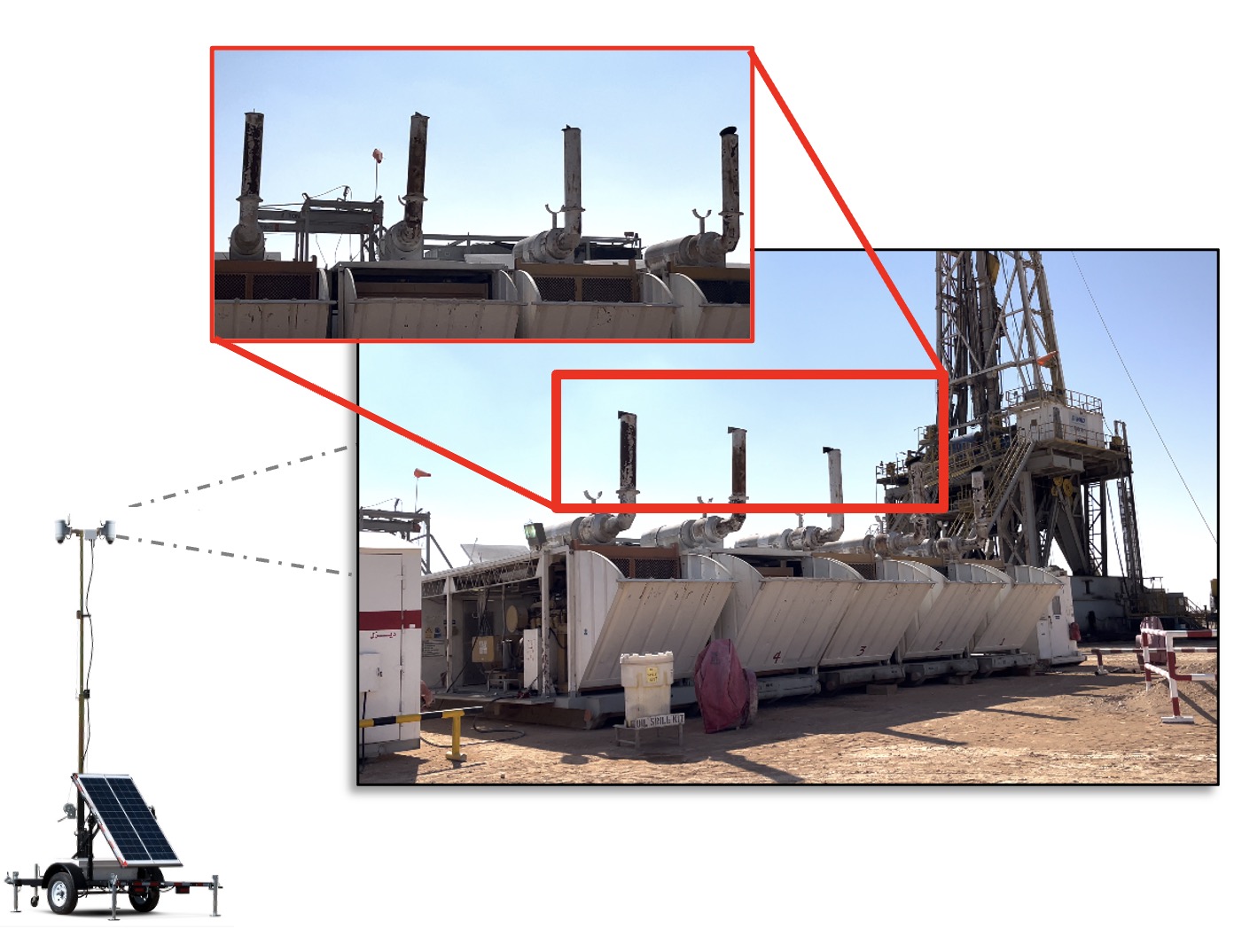
ADES drilling rig · solar-powered camera trailer · PTZ cam + Jetson Xavier NX

Solar-powered camera trailer at the drilling rig site, with a callout zoom on the row of generator exhaust pipes and lids that the on-device detector watches.

What the camera watches · exhaust lid angle → load class

17 / 19 · Drillstring dynamics
edge CV · Aramco × KAUST

Drillstring dynamics, from a single camera.

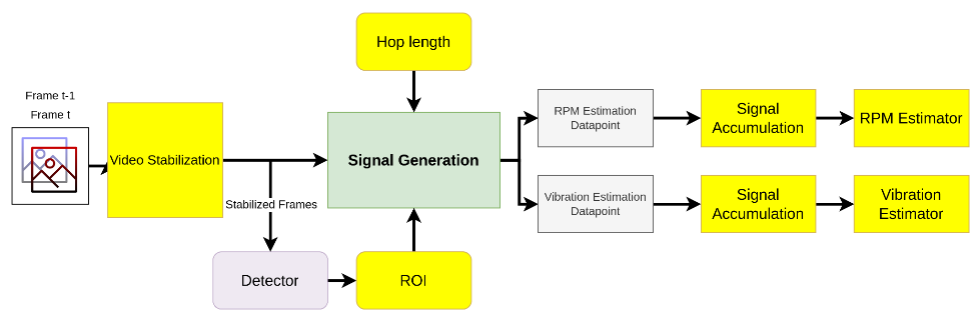
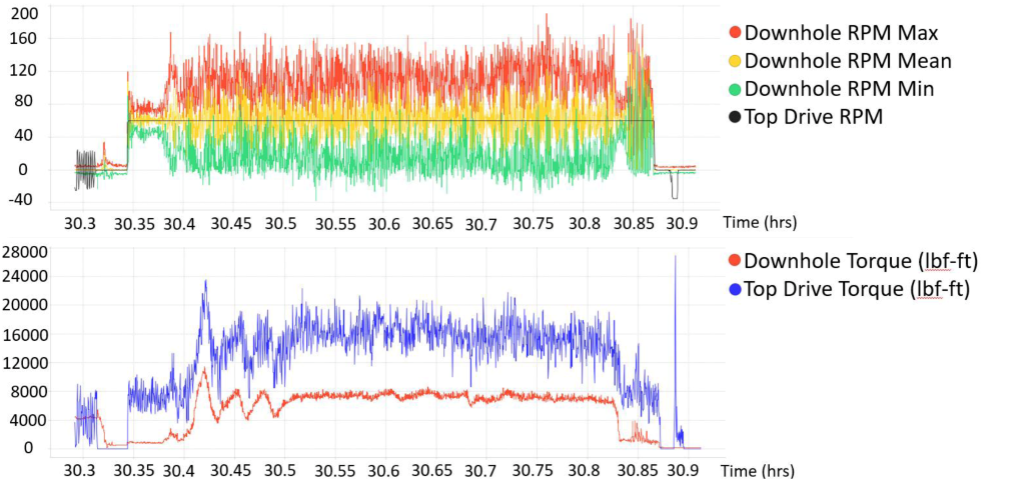
Same edge-CV camera, different inference: video stabilisation → ROI tracking → signal generation → downhole RPM and vibration estimates. Stick-slip and twist-off events surface on a dashboard without putting any new sensor downhole.
01 Frame integrity capture + corruption check; auto-reconnect on stream loss
02 Purpose-trained detector single-stage real-time CNN, 1,600+ annotated frames across day / night / occlusion
03 Tracker & association custom logic pairs detected objects across frames; stable IDs
04 Occlusion logic flags blocked targets instead of guessing — no silent bad data
05 Signal → class / estimate per-target calibration; project-specific inference head
06 Status & heartbeat streamed to backend; operator dashboard refresh every 5 s

Edge inference

  • NVIDIA Jetson Xavier NX
  • TensorRT-compiled detector graph
  • PTZ camera · on-device buffering

Services & data

  • Python AI worker → Django REST
  • PostgreSQL (status · heartbeat · cameras)
  • React operator dashboard

Ops & deploy

  • Docker Compose — one-command spin-up
  • Auto-restart on unexpected shutdown
  • 3-day per-station calibration protocol
Failure-mode
discipline
AI worker down → backend marks DOWN after grace window.  Camera stream lost → reconnect loop, 5 attempts × 5 s, recover-on-success.  Backend down → dashboard banner + inference buffered locally; no data loss on the next sync.
01 · input
Pipe rotation, captured live
02 · process
On-device computer-vision pipeline: Frame t-1 / Frame t → video stabilisation → detector → ROI → signal generation (with hop length) → RPM and vibration datapoints → signal accumulation → RPM and vibration estimators.
Pipeline · frame → stabilise → ROI → signal → estimator
03 · output
Time-series plot of downhole RPM (max/mean/min) with top-drive RPM overlaid, and downhole torque vs top-drive torque below.
Downhole RPM & torque · derived from video alone
18 / 19 · United Robotics Group
strategic partner · DE

Robotics partner — United Robotics Group.

KAUST robotics collaboration with United Robotics Group (Germany) — a unified portfolio spanning autonomous mobile robots, lab-automation manipulators, and a humanoid programme. Direct pathway into Beacon §3.2 (humanoid & advanced robotics).
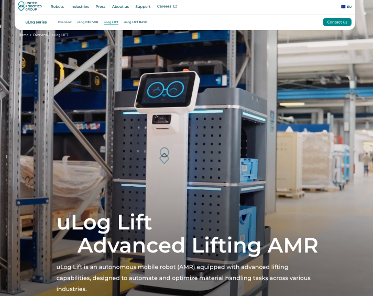
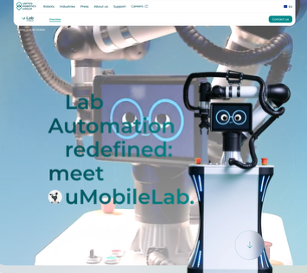
uLog Lift — an advanced lifting autonomous mobile robot from United Robotics Group, designed to automate and optimise human-handling tasks across industries.
uLog Lift advanced lifting AMR · industrial material handling
uMobileLab — a mobile lab-automation manipulator from United Robotics Group.
uMobileLab mobile lab-automation manipulator
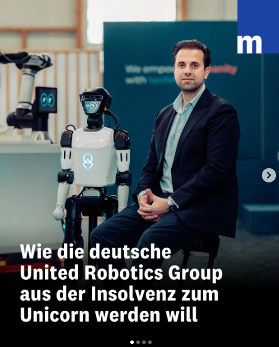
United Robotics Group humanoid programme — featured in German manufacturing press.
Humanoid programme URG bipedal platform · advanced robotics roadmap
19 / 19 · Mapping to Project Beacon
capability → workstream

How this maps to Project Beacon.

§3.1 · Primary near-term

Vision Anomaly Detection

Sub-millimetre photogrammetric reconstruction (BitXaminer). Edge CV in production with calibration discipline (GenSet, Drillstring). Multi-method on-line inspection (LineEye / HiRoll). Architecture pattern transfers to AMP2's electrical-clip station at the 0.10 mm target.

→ slides 13 · 14 · 15 · 16 · 17

§3.2 · Robotics

Humanoid & Advanced Robotics

Active partnership with United Robotics Group (DE) — autonomous mobile robots, lab-automation manipulators, humanoid platform. Robotic cells composited directly into captured plant geometry for prototyping prior to physical install.

→ slides 12 · 18

§3.3 · Digital Twin

Digital Twin & Simulation

GPU pedestrian / AMR-traffic model with reinforcement-learned destination policies over the KAUST campus twin (CitiesOS). 3D-Gaussian capture of real industrial space, executed at scale on Shaheen III.

→ slides 03 · 04 · 06 · 07 · 08

§3.4 · AR / VR

AR / VR for Manufacturing

Browser-renderable 3D-Gaussian scenes used as virtual process walkthroughs — robotic cells, conveyors, sensors composited on the captured environment. Operator training and pre-build line review without bespoke hardware.

→ slides 10 · 11 · 12

Omniverse compatibility. 3D-Gaussian scenes we capture at KAUST are natively importable into NVIDIA Omniverse via the NuRec libraries (3DGS → OpenUSD), so they sit alongside Lucid's existing Omniverse work on the AMP1 Powertrain Pack Line rather than replacing it.

Questions ?

Mohammed-iliès Ayachi · mohammed.ayachi@kaust.edu.sa
Prof. Shehab Ahmed · shehab.ahmed@kaust.edu.sa